Episode six of the Shopware plugin series. Video here, code in the GitHub repo.
Questions outside the product page
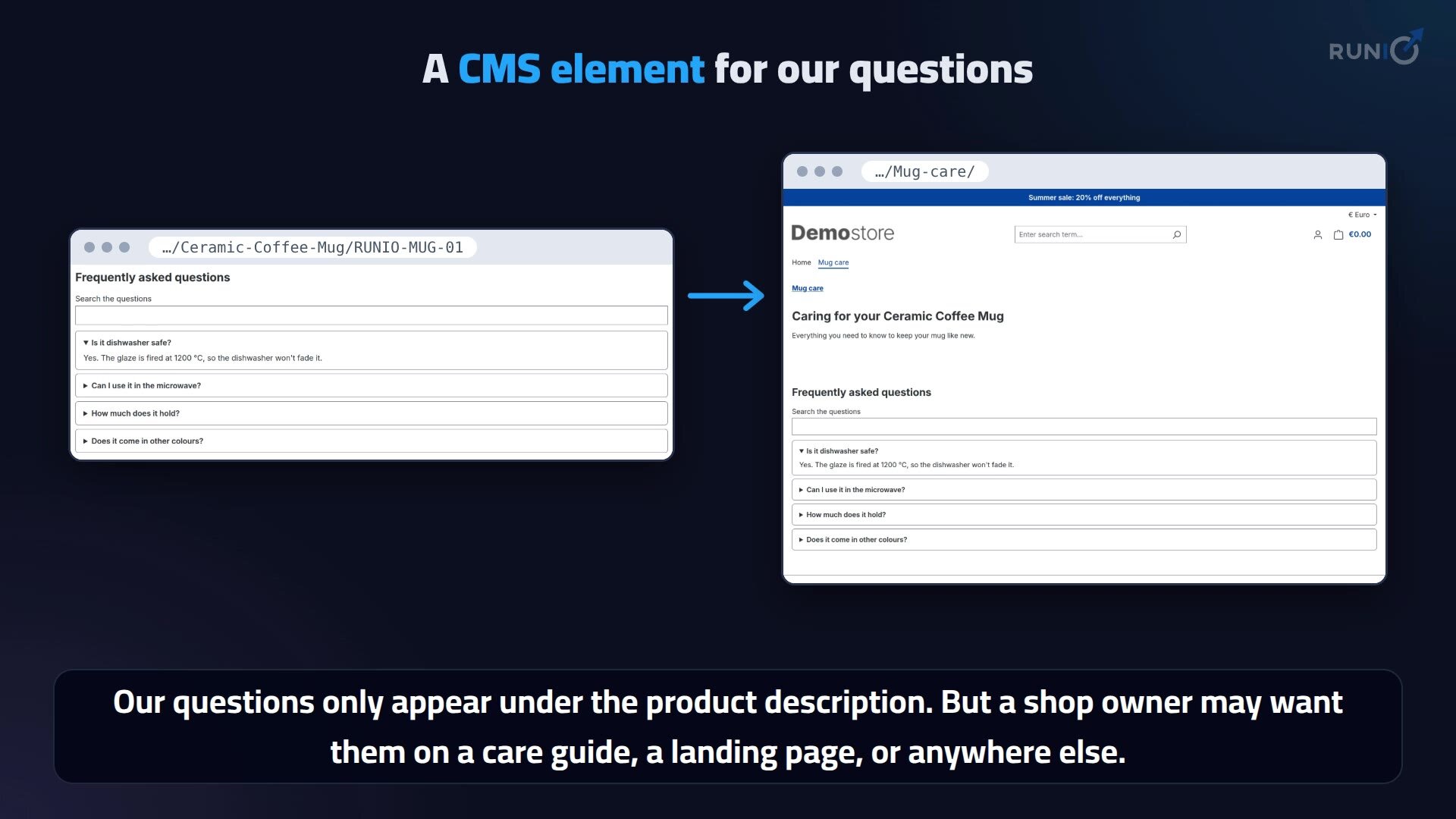
Right now the questions only appear under the product description. But a shop owner might want them on a care guide, a landing page or somewhere else entirely, and they shouldn't need a developer to put them there. Shopping Experiences, Shopware's layout editor, is the place for that. So the questions become a CMS element.
Sections, blocks, slots, elements
A layout is made of sections. Sections hold blocks, and every block has slots. An element fills one slot.
That means we don't need a block of our own. The shop owner picks any existing block and swaps the element in one of its slots for ours. Less code for us, and more freedom for them.
There are three parts to build: the admin side with three small components, a PHP resolver that loads the data, and a storefront template.
Registering the element
Shopware.Component.register('runio-cms-el-product-faq', () => import('./component'));
Shopware.Component.register('runio-cms-el-config-product-faq', () => import('./config'));
Shopware.Component.register('runio-cms-el-preview-product-faq', () => import('./preview'));

Shopware.Service('cmsService').registerCmsElement({
    name: 'runio-product-faq',
    label: 'runio-product-faq.cms.label',
    component: 'runio-cms-el-product-faq',
    configComponent: 'runio-cms-el-config-product-faq',
    previewComponent: 'runio-cms-el-preview-product-faq',
    defaultConfig: {
        product: {
            source: 'static',
            value: null,
        },
    },
});
Our element has one setting, a product. The three components each have one job:
- The preview is the little tile you see in the element picker.
- The component draws the element inside the editor. It loads the chosen product's questions with the admin repository, and loads them again whenever the product changes.
- The config component is the settings dialog. Here it's a single product picker bound to the element's config.
One detail in the editor component is worth copying. If the shop owner switches products quickly, an older request can finish after a newer one. So before using a result, the component checks that the product is still the one it asked for:
// Ignore an older answer when the product was changed meanwhile
if (productId === this.productId) {
    this.faqs = faqs;
}
Loading data on the storefront
On the storefront, a data resolver fills each element with data. Its type has to match the element name:
public function getType(): string
{
    return 'runio-product-faq';
}

public function enrich(CmsSlotEntity $slot, ResolverContext $resolverContext, ElementDataCollection $result): void
{
    $productId = $slot->getFieldConfig()->get('product')?->getStringValue();

    // On a product page layout, no product in the settings means "the product of this page"
    if (!$productId
        && $resolverContext instanceof EntityResolverContext
        && $resolverContext->getDefinition()->getEntityName() === 'product') {
        $productId = $resolverContext->getEntity()->getUniqueIdentifier();
    }

    if (!$productId) {
        return;
    }

    try {
        $route = $this->faqRoute->load($productId, new Criteria(), $resolverContext->getSalesChannelContext());
    } catch (ProductNotFoundException) {
        // A product that was deleted or hidden after the layout was made
        return;
    }

    $slot->setData($route->getFaqs());
}
Two things I like about this.
First, the empty setting. If the element sits on a product page layout and nobody picked a product, it uses the product of the page. So one layout works for every product.
Second, it doesn't query the database itself. It calls the Store API route from the last episode. Visibility rules and filters stay in one place, and a hidden product never shows its questions here either.
The resolver is registered as a service with the shopware.cms.data_resolver tag.
The storefront template
The template name follows a convention: cms-element- plus the element name, so cms-element-runio-product-faq.html.twig. Both this template and the product description now include one shared FAQ template, so the markup exists only once:
<div class="cms-element-runio-product-faq">
    {% sw_include '@RunioProductFaq/storefront/component/runio-faq/faq-list.html.twig' with {
        faqs: element.data ?? [],
        inputId: 'runio-faq-search-' ~ element.id,
    } %}
</div>
The input ID comes from the element ID, so two FAQ elements on the same page don't clash.
Keeping the cache honest
Pages with a CMS element get cached. The route adds a runio-product-faq cache tag when it loads questions, and a small subscriber listens for runio_product_faq.written and runio_product_faq.deleted and invalidates that tag. So when the shop owner edits a question, the pages showing it are refreshed, not just the product page.
Trying it
After an admin build, Product FAQ shows up in the element picker. Choose the mug in the settings and the editor shows its questions. On the storefront, the care guide page shows them too. The search box from episode four works there as well, because it binds to the data attribute, not to the product page.
Recap
registerCmsElement with a component, a config and a preview, a data resolver that reuses our Store API route, a storefront template named after the element, and a cache tag so changes show up everywhere.
Next episode, customers get to ask their own questions right on the product page.
Author Amer Malik Mohammed
Full-Stack Developer with 2+ years of experience in object-oriented PHP development (Symfony), JavaScript and MySQL. Specialized in e-commerce solutions (Shopware 5/6), REST API development and process automation in agile teams.
Contact author