Every developer eventually builds something because nothing else quite fits. For me, that something was a Symfony bundle for a rich Markdown editor that works correctly with Arabic (RTL) content. The result is runio/mde, available on Packagist.
This post explains the why and the how. For the broader context — why I needed this in the first place — see Building a Multilingual Portfolio with Symfony.
What runio/mde Does
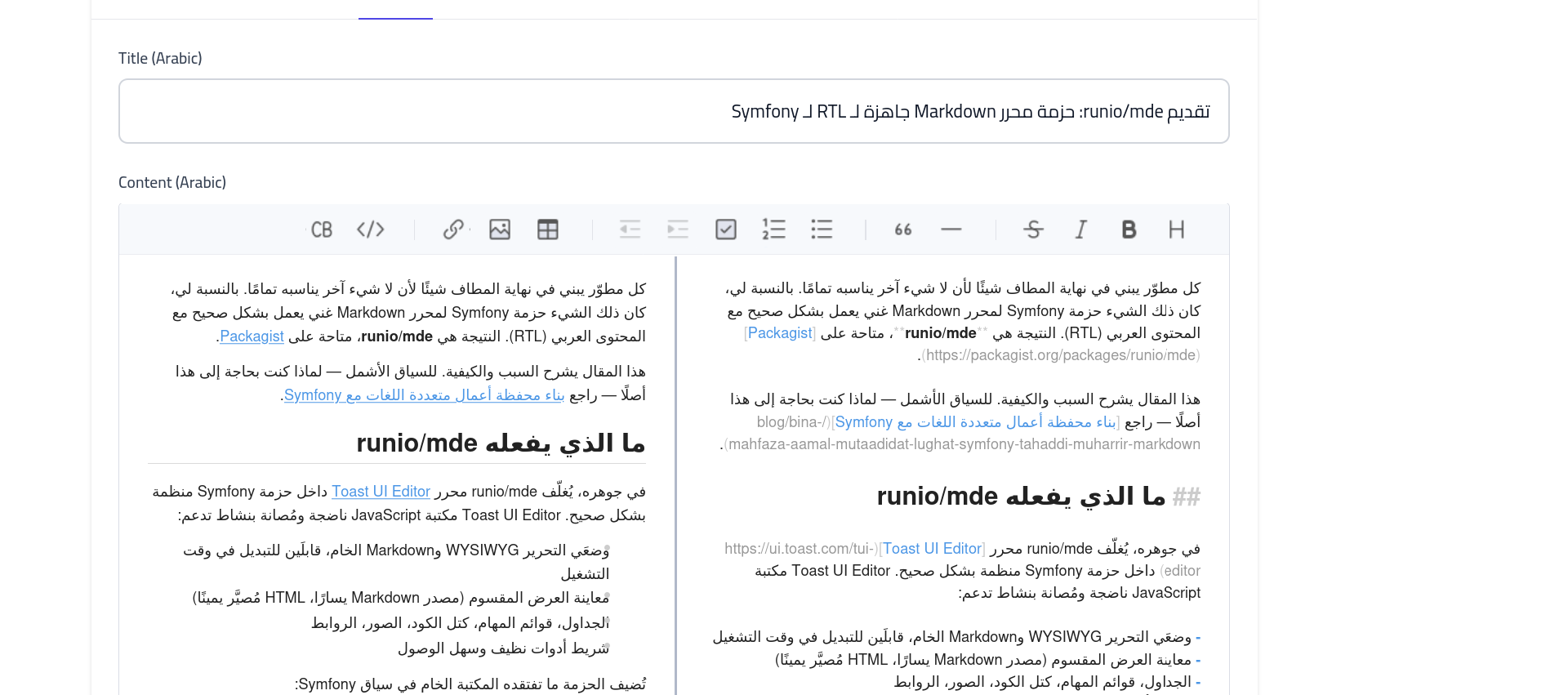
At its core, runio/mde wraps Toast UI Editor inside a proper Symfony bundle. Toast UI Editor is a mature, actively maintained JavaScript library that supports:
- WYSIWYG and raw Markdown editing modes, switchable at runtime
- Split-view preview (Markdown source left, rendered HTML right)
- Tables, task lists, code blocks, images, links
- A clean, accessible toolbar
The bundle adds what the raw library lacks in a Symfony context:
- Symfony form type (
MarkdownEditorType) with all options configurable - Twig filter
|markdownfor rendering stored Markdown on display pages - RTL/LTR CSS layer that correctly handles Arabic, Hebrew, Persian, Urdu
- All assets served locally — no
uicdn.toast.com, nofonts.googleapis.com - Symfony Asset Mapper compatibility
- Symfony UX Turbo support
- Mobile-responsive layout via CSS media queries
- Proper service registration (no manual
services.yamlworkarounds)
Installation
composer require runio/mde
php bin/console assets:install --symlink
If your project uses Asset Mapper (Symfony 6.3+), add the bundle's asset path to config/packages/asset_mapper.yaml:
framework:
    asset_mapper:
        paths:
            assets/: ''
            vendor/runio/mde/public/: bundles/runiomarkdowneditor/
Then compile:
php bin/console asset-map:compile
Register the form theme in config/packages/twig.yaml:
twig:
    form_themes:
        - '@RunioMarkdownEditor/form/markdown_editor_widget.html.twig'
Using the Form Type
use Runio\MarkdownEditorBundle\Form\Type\MarkdownEditorType;

$builder->add('content', MarkdownEditorType::class, [
    'editor_mode'      => 'wysiwyg',   // wysiwyg | markdown | both
    'rtl_enabled'      => false,
    'language'         => 'en',
    'toolbar'          => 'full',      // full | basic | minimal
    'preview_style'    => 'vertical',  // vertical | tab
    'theme'            => 'light',     // light | dark
    'editor_height'    => '500px',
    'show_mode_switch' => true,
]);

// For Arabic content:
$builder->add('contentAr', MarkdownEditorType::class, [
    'editor_mode'  => 'wysiwyg',
    'rtl_enabled'  => true,
    'language'     => 'ar',
]);
Rendering Stored Markdown
In your Twig templates, use the |markdown filter:
<div class="prose">
    {{ post.content | markdown }}
</div>
The filter runs the content through CommonMark and a sanitization layer that strips unsafe tags and attributes. The sanitization is configurable:
# config/packages/runio_markdown_editor.yaml
runio_markdown_editor:
    sanitization:
        enabled: true
        allowed_tags: [p, br, strong, em, blockquote, ul, ol, li, a, img, h1, h2, h3, h4, h5, h6, pre, code, table, thead, tbody, tr, th, td, hr]
        allowed_attributes: [href, src, alt, title, class, id, dir, lang]
Architecture
The PHP Layer
The bundle exposes three services:
MarkdownParser — converts Markdown to HTML using league/commonmark. Configurable via the markdown section of the bundle config:
runio_markdown_editor:
    markdown:
        html_input: escape        # strip | allow | escape
        allow_unsafe_links: false
        enable_table_extension: true
        enable_strikethrough_extension: true
        enable_tasklist_extension: true
        enable_autolink_extension: true
RTLTextDetector — detects whether a string contains RTL characters (Arabic, Hebrew, Persian, Urdu Unicode ranges). Used to auto-detect text direction when auto_detect: true.
SanitizationService — strips disallowed HTML tags and attributes from parsed output.
MarkdownRuntime — the Twig runtime that registers the |markdown and |markdown_inline filters. This is registered as a proper service in the bundle's services.yaml — no manual registration required in the application.
The JavaScript Layer
The JavaScript (public/js/markdown-editor.js) is a thin wrapper around toastui.Editor. It:
- Checks whether
toastuiis available before initializing — falls back gracefully to a plain textarea if the JS fails to load - Picks responsive height and preview style based on viewport on first load
- Syncs the hidden
<textarea>value on every editor change and on form submit - Handles image uploads via
fetchif an upload URL is configured - Supports Turbo navigation via
turbo:loadandturbo:before-cachelifecycle events
The editor auto-initializes on any .markdown-editor-rtl-wrapper element found in the DOM, and re-initializes on dynamically added content via MutationObserver.
The CSS Layer
The RTL CSS (public/css/markdown-editor-rtl.css) applies correct styling when the wrapper has dir="rtl":
- Text alignment and direction for all content regions
- Blockquote border flipped to the right side
- List padding flipped to the right side
- Code blocks always LTR regardless of surrounding direction
- Splitter (split-view divider) positioned correctly — this was the key bug fix
The mobile responsive section handles:
- Toolbar icon sizing at
<768pxand<480px - Dropdown toolbar constrained to editor width (prevents overflow)
- Split-view panels stack vertically on mobile
- Popup positioning corrected for small viewports
The Bugs I Fixed
The previous open-source Symfony integration for Toast UI had two significant issues:
1. Invisible RTL Splitter
In split-view mode with RTL enabled, the dividing line between the Markdown input and the preview was invisible. The cause: a CSS rule adding left: auto; right: 0 to .toastui-editor-md-splitter. This moved the element to left: 859px in an 860px container — one pixel off screen. Removing the override lets Toast UI position it correctly at 50%.
2. Unregistered Twig Runtime
The services.yaml in the previous bundle had the MarkdownRuntime service registration commented out. The |markdown filter appeared to exist (the extension was registered) but calling it threw a runtime error. The fix is simply ensuring the service is registered correctly — one line in services.yaml.
Multilingual Configuration
The default config targets Arabic content, but any RTL language works:
runio_markdown_editor:
    default_config:
        rtl_enabled: true
        language: ar
    rtl:
        languages: [ar, he, fa, ur]
        auto_detect: true
        arabic_font: 'Noto Naskh Arabic'
Per-field overrides let you mix RTL and LTR editors in the same form, which is exactly what I do in sym-port's blog post form — one editor per language, each configured appropriately.
What's Next
The bundle is functional and in active use on my portfolio. Planned improvements:
- Image upload UI — a proper upload dialog rather than requiring an external endpoint
- Custom toolbar buttons — allowing applications to register additional toolbar items
- Atom feed helper — a Twig function for rendering Markdown content in feed contexts
The source is on GitHub and the package is on Packagist under runio/mde. Issues and pull requests welcome.
Author Amer Malik Mohammed
Full-Stack Developer with 2+ years of experience in object-oriented PHP development (Symfony), JavaScript and MySQL. Specialized in e-commerce solutions (Shopware 5/6), REST API development and process automation in agile teams.
Contact author